How to stake SOL
Open the staking section of your wallet (Phantom, Solflare, or either one with a Ledger), pick a validator, type the amount and approve one transaction. Your SOL goes into a stake account that only your wallet controls. It starts earning from the next epoch, Solana's reward period of about a day, and you can unstake at any time.
What do you need before you start?
The staking itself takes a few minutes. Sorting out these four things first avoids the most common mistakes:
- SOL in a wallet you control. Phantom, Solflare and Backpack all support native staking, which means staking directly with a validator from your own wallet. If your SOL is on an exchange, withdraw it to your wallet first. Exchange staking is a different product with its own rules; see Exchange staking or your own wallet?
- Enough SOL to stake. Solana requires at least 1 SOL for each new stake, plus a small refundable deposit.
- About 0.05 SOL left over. Every transaction costs a small fee, and later you'll need two more transactions to unstake and withdraw. Don't stake your whole balance.
- A validator picked in advance. This matters more than which wallet you use. The section below shows how to pick one.
You never need your seed phrase to stake. Staking only asks you to approve a transaction inside your own wallet.
If a site, an app or a "support agent" asks for your recovery phrase, or tells you to send SOL to an address to stake it, that's a scam.
What happens to my SOL when I stake it?
Your SOL doesn't go to the validator. Your wallet creates a stake account, a separate account on the Solana blockchain that holds the SOL you stake, and only your wallet controls it.
The stake account lends your SOL's weight to the validator you chose, and the validator uses that weight to help run the network. The network pays rewards for this once per epoch, Solana's reward period of about a day. The validator keeps its commission (its cut), and you get the rest.
This is why your main balance drops after you stake. The SOL has moved to the stake account, which most wallets list in a separate staking section. It's easy to read that drop as "my SOL is gone", but it hasn't gone anywhere. It's in a different place inside the same wallet.
The wallet also puts a small deposit into the stake account, less than 0.002 SOL, because every account on Solana has to hold a minimum balance to exist.
The validator never holds your coins, so it can't take them. The worst a badly run validator can do is go offline or raise its commission. Either one costs you rewards, not SOL. No slashing (a penalty that cuts stake) has been switched on in Solana so far. The details are in Is staking SOL safe?
How do I pick a validator?
Your wallet will probably suggest one. The suggestion usually comes with no reason attached, and you rarely see the alternatives next to it. Choosing for yourself takes a few minutes if you know what to look at:
- Fees. Inflation commission is the validator's cut of your regular rewards. Some validators run Jito, software that collects MEV tips (extra payments from traders who want their transactions in a certain order). Those validators also take an MEV commission on the tips.
- Uptime. An offline validator earns you nothing until it's back.
- Track record. Look for a long history without sudden commission raises. Some new validators start at 0% and raise their fees once the stake arrives.
Our validator pages show all of this in one place: a one-line verdict under the name, a 0–100 Score, the fees and a 90-day uptime strip. The full checklist is in How to choose a Solana validator.
Once you've decided, copy the validator's vote account from its page. That's the address your stake will point at. Pasting it is the surest way to find the right validator in your wallet.
How do I stake SOL in Phantom?
In Phantom, you create a native stake in the browser extension. The mobile app can't create one; its staking option is Phantom staked SOL (PSOL), a liquid staking token. Button names can change between versions. These steps follow Phantom's help center as of September 2026.
- Open the Phantom browser extension and select the account that holds your SOL.
- Open Solana from your token list, then choose More → Stake SOL.
- Choose Native Staking.
- Choose your validator. Check that its vote account matches the one on the validator's page, because names can look alike.
- Enter the amount: at least 1 SOL, leaving about 0.05 SOL unstaked for fees.
- Click Stake, review and approve.
- The new stake appears under Native Stakes in the Solana view. It's marked "Activating" until the next epoch starts.
Phantom says native staking costs nothing beyond network fees. The validator's commission is separate: it keeps a share of your rewards.
To see rewards later, open Solana, then Native Stakes, then Other and the stake account. Phantom shows the last reward there.
You can't add SOL to an existing stake in Phantom. Create another stake, or unstake and stake again.
How do I stake SOL in Solflare?
These steps follow Solflare's help center as of September 2026.
- Open Solflare and select the wallet that holds your SOL.
- Open the Staking tab and choose Stake.
- Solflare may pre-select a validator. Use the validator menu to choose a different one.
- Pick your validator and check that its vote account matches the one on its page.
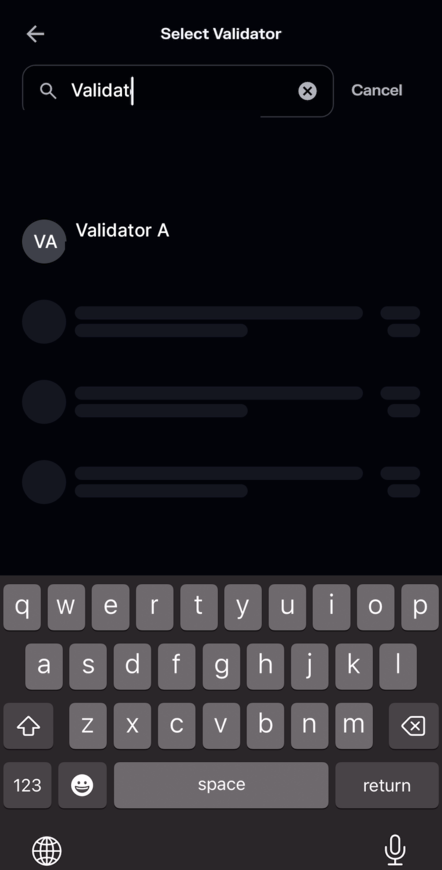
No real balance shown here. APY is blacked out on purpose, not a UI bug — check the real number on the validator's page. - Enter the amount: at least 1 SOL, leaving about 0.05 SOL unstaked for fees.
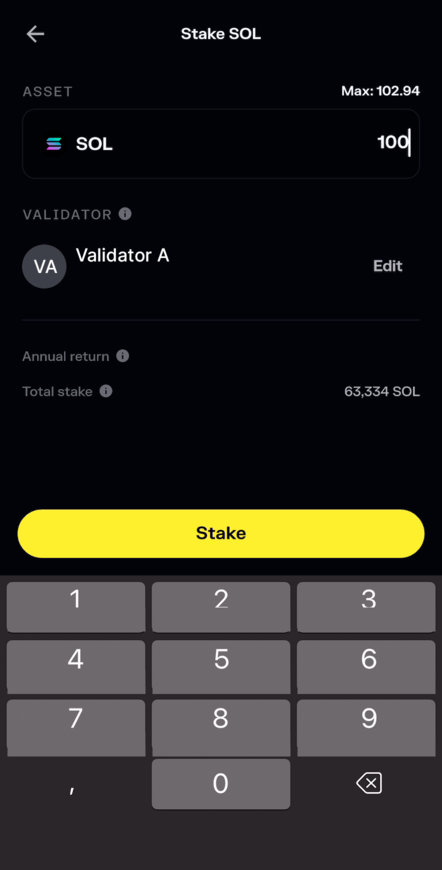
Solflare app; the amounts are an example. APY and annual return are blacked out on purpose, not a UI bug — check the real number on the validator's page. - Review the summary and approve.
- The stake appears in the Staking tab as activating until the next epoch.
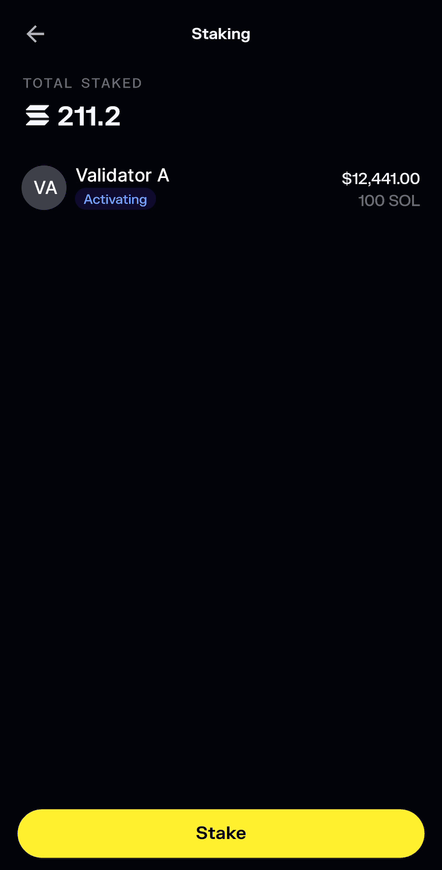
Solflare app; the amounts are an example.


How do I stake SOL with a Ledger?
A Ledger doesn't change how staking works, only who signs: your keys stay on the device, and you approve every transaction on its screen. You can stake in Ledger Wallet itself, or connect the Ledger to Phantom or Solflare and follow the steps above.
If the wallet asks for blind signing, turn it on only for that step, check the details on the device and turn it off again. You'll need the device again to unstake and withdraw.
When do my staking rewards arrive?
New stake has to wait for an epoch change before it starts working, so your first reward takes longer than the ones after it.
| When | What you'll see |
|---|---|
| Right after you approve | A new stake account, marked "activating" (the wording varies by wallet) |
| At the next epoch change, within about a day | The stake turns active and starts earning |
| At the end of its first full epoch | Your first reward, added to the stake account |
| Every epoch after that | Another reward, added to the same stake account |
In practice, expect your first reward about two epoch changes after you stake. It can take longer at busy times. The network limits how much new stake can switch on in one epoch, so some of it may have to wait for the next one.
Rewards go into the stake account, not your main balance, and from then on they earn rewards too. How Solana staking pays you explains how the amounts add up.
How do I know my stake is working?
Wallet app reviews contain lines like "I cannot view my solana staking earnings" and "I can't find my staked SOL." Staked SOL sits in a stake account, away from the balance you normally check, so it's easy to lose track of.
There are two ways to keep an eye on it:
- Check your validator's page now and then. The verdict line shows right away whether it's offline or has raised its fees, and the uptime strip covers the last 90 days.
- Let our Telegram bot watch it. Give the bot your wallet's public address. It reports your rewards every epoch and messages you if your validator goes offline or changes its commission. A public key can't sign transactions or move SOL, and the bot never asks for your seed phrase.
Questions
At least 1 SOL for a new stake, plus a little extra. Keep about 0.05 SOL unstaked to pay the network fees now and later, when you unstake and withdraw. Rewards grow in proportion to your stake, so 10 SOL earns ten times what 1 SOL does at the same validator.
Yes. Each stake gets its own stake account, and each account can point at a different validator. Some holders split between two or three so that one outage only hits part of their rewards. Every account needs at least 1 SOL and its own small deposit, so splitting suits larger balances better.
No. Your SOL sits in a stake account that only your wallet controls. The validator gets your stake's voting weight, not the coins. The worst it can do is go offline or raise its commission, which costs you rewards, not SOL. No slashing (a penalty that cuts stake) has been switched on in Solana so far.
Because the staked SOL moved out of your main balance into a stake account. It's still in your wallet, usually under a staking or "staked" section. Add the two together and your total has only dropped by the network fee. From then on, the stake account grows each epoch as rewards arrive.
Yes. Staking again, even with the same validator, usually creates a second stake account next to the first. That's normal, not a mistake. Each account earns rewards on its own and appears in your wallet's staking section. Every new stake needs at least 1 SOL, and you still need a little SOL left over for fees.